Buy work-shop.eu ?
We are moving the project
work-shop.eu .
Are you interested in purchasing the domain
work-shop.eu ?
domain@kv-gmbh.de · 0541-91531010
Buy work-shop.eu ?
How does 3D design work with Blender?
Blender is a powerful 3D design software that allows users to create and manipulate 3D models, animations, and visual effects. Users can start by creating a 3D model using various tools and techniques such as sculpting, modeling, and texturing. They can then add materials, lighting, and camera angles to enhance the visual appeal of the design. Blender also offers features for animation, rigging, and simulation, allowing users to bring their designs to life. Overall, Blender provides a comprehensive set of tools and features for 3D design, making it a popular choice for artists, designers, and animators. **
How does Blender 2 work?
Blender 2 is a 3D modeling and animation software that works by allowing users to create and manipulate 3D models, animations, and visual effects. It uses a combination of tools and features such as modeling, sculpting, texturing, rigging, animation, and rendering to bring 3D designs to life. Users can create objects and characters, apply textures and materials, animate movements, and render the final output. Blender 2 also supports various file formats and has a customizable interface, making it a versatile and powerful tool for 3D design and animation. **


Similar search terms for Blender
Top-Angebote
Products related to Blender:
-
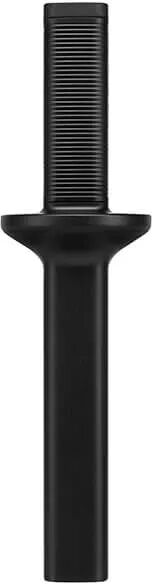
KitchenAid Artisan K400 Blender TamperThe KitchenAid Artisan K400 Blender Tamper is a useful accessory to have when making ultra-thick blends such as nut butter or hummus. Using the BPA-free tamper helps to process the blend, pushing thicker ingredients into the vortex and eliminating air pockets which can sometimes occur. The KitchenAid K400 blender tamper is dishwasher safe and is supplied with a 2 year KitchenAid guarantee.25,96 £*Shipping: 3,50 £Secure redirect to the provider
-
KitchenAid Artisan Candy Apple K400 BlenderBuilt for everyday use, the Artisan Candy Apple K400 Blender from KitchenAid has a die-cast metal base for strength, stability and durability. Its understated design oozes soft curves and industrial chic and will proudly stand centre stage in your kitchen, matching your personality and quickly becoming an essential part of your healthy lifestyle. Designed for the perfect taste, it easily blends even the toughest of ingredients for the smoothest of results and is available in a range of exciting colours to match your personality, style and surroundings.• Central control dial - pulse, 5 speed settings, 3 preset programs and self-clean cycle• Intelli-speed 1.5 peak HP motor• Asymmetric hardened stainless steel blades• 1.4 litre ribbed glass jar• Vented solid-seal silicone lid with a removable measuring cap.• Range of accessories available separately to match your lifestyle• 5 year KitchenAid guarantee.248,95 £*Shipping: 0,00 £Secure redirect to the provider
-
KitchenAid Artisan Medallion Silver K400 BlenderBuilt for everyday use, the Artisan Empire Red K400 Blender from KitchenAid has a die-cast metal base for strength, stability and durability. Its understated design oozes soft curves and industrial chic and will proudly stand centre stage in your kitchen, matching your personality and quickly becoming an essential part of your healthy lifestyle. Designed for the perfect taste, it easily blends even the toughest of ingredients for the smoothest of results and is available in a range of exciting colours to match your personality, style and surroundings.• Central control dial - pulse, 5 speed settings, 3 preset programs and self-clean cycle• Intelli-speed 1.5 peak HP motor• Asymmetric hardened stainless steel blades• 1.4 litre ribbed glass jar• Vented solid-seal silicone lid with a removable measuring cap.• Range of accessories available separately to match your lifestyle• 5 year KitchenAid guarantee.248,95 £*Shipping: 0,00 £Secure redirect to the provider
-
KitchenAid Artisan Onyx Black K400 BlenderBuilt for everyday use, the Artisan Onyx Black K400 Blender from KitchenAid has a die-cast metal base for strength, stability and durability. Its understated design oozes soft curves and industrial chic and will proudly stand centre stage in your kitchen, matching your personality and quickly becoming an essential part of your healthy lifestyle. Designed for the perfect taste, it easily blends even the toughest of ingredients for the smoothest of results and is available in a range of exciting colours to match your personality, style and surroundings.• Central control dial - pulse, 5 speed settings, 3 preset programs and self-clean cycle• Intelli-speed 1.5 peak HP motor• Asymmetric hardened stainless steel blades• 1.4 litre ribbed glass jar• Vented solid-seal silicone lid with a removable measuring cap.• Range of accessories available separately to match your lifestyle• 5 year KitchenAid guarantee.248,95 £*Shipping: 0,00 £Secure redirect to the provider


-
Why doesn't the Blender Boolean work?
The Blender Boolean operation may not work due to various reasons such as overlapping geometry, non-manifold geometry, or complex geometry with a high level of detail. These issues can cause errors in the Boolean operation and result in unexpected or incorrect results. It is important to ensure that the geometry is clean and well-prepared before applying the Boolean operation in Blender. Additionally, using the correct Boolean operation type (Union, Difference, or Intersection) and adjusting the operation settings can also help improve the success rate of the Boolean operation in Blender. **
-
Why doesn't zooming work in Blender?
Zooming may not work in Blender due to a few reasons. One common reason is that the user may not be in the correct mode for zooming, such as being in the wrong viewport or having a different tool selected. Another reason could be a technical issue, such as a glitch or bug in the software. It is also possible that the user's mouse or keyboard settings are not properly configured for zooming in Blender. **
-
Did Unreal Engine and Blender work together?
Yes, Unreal Engine and Blender have worked together to provide a seamless workflow for game developers and artists. Blender is a popular open-source 3D creation software that can be used to create assets and animations, which can then be imported into Unreal Engine for game development. The two tools complement each other well, allowing users to create high-quality content and bring their ideas to life in Unreal Engine. Additionally, both Unreal Engine and Blender have active communities that share resources and provide support for users looking to integrate the two platforms. **
-
How does the Blender road system work?
The Blender road system allows users to create and manipulate roads within the 3D environment. Users can add roads by using the "Add" menu and selecting "Mesh" and then "Roads." Once a road is added, users can adjust its shape, width, and other properties using the road editing tools. The road system also allows for the creation of intersections, bridges, and tunnels, making it a versatile tool for creating realistic road networks within Blender. **

How can one work with a blender?
To work with a blender, start by assembling the blender by attaching the pitcher to the base and securing the lid. Next, add the ingredients you want to blend into the pitcher, making sure not to overfill it. Then, plug in the blender and select the appropriate speed or setting for the ingredients you are blending. Finally, press the power button to start the blending process and hold it until the ingredients are fully blended to your desired consistency. Always remember to unplug the blender and disassemble it for cleaning after each use. **
Why do the controls not work in Blender?
The controls in Blender may not work due to various reasons such as software glitches, outdated drivers, conflicting key bindings, or hardware issues. It is important to ensure that the software is up to date, the drivers are updated, and there are no conflicts with other programs or devices. Additionally, checking the hardware components such as the keyboard and mouse for any malfunctions can help resolve control issues in Blender. **
Top-Angebote
Products related to Blender:
-
KitchenAid Artisan K400 BlenderBuilt for everyday use, the KitchenAid Artisan K400 Blender has a die-cast metal base for strength, stability and durability. Its understated design oozes soft curves and industrial chic and will proudly stand centre stage in your kitchen, matching your personality and quickly becoming an essential part of your healthy lifestyle. Designed for the perfect taste, it easily blends even the toughest of ingredients for the smoothest of results and is available in a range of exciting colours to match your personality, style and surroundings. • Central control dial - pulse, 5 speed settings, 3 preset programs and self-clean cycle • Intelli-speed 1.5 peak HP motor • Asymmetric hardened stainless steel blades • 1.4 litre ribbed glass jar • Vented solid-seal silicone lid with a removable measuring cap • Range of accessories available separately to match your lifestyle • 5 year KitchenAid guarantee248,95 £*Shipping: 0,00 £Secure redirect to the provider
-
KitchenAid Artisan Pistachio K400 BlenderBuilt for everyday use, the Artisan Pistachio K400 Blender from KitchenAid has a die-cast metal base for strength, stability and durability. Its understated design oozes soft curves and industrial chic and will proudly stand centre stage in your kitchen, matching your personality and quickly becoming an essential part of your healthy lifestyle. Designed for the perfect taste, it easily blends even the toughest of ingredients for the smoothest of results and is available in a range of exciting colours to match your personality, style and surroundings.• Central control dial - pulse, 5 speed settings, 3 preset programs and self-clean cycle• Intelli-speed 1.5 peak HP motor• Asymmetric hardened stainless steel blades• 1.4 litre ribbed glass jar• Vented solid-seal silicone lid with a removable measuring cap.• Range of accessories available separately to match your lifestyle• 5 year KitchenAid guarantee.248,95 £*Shipping: 0,00 £Secure redirect to the provider
-
KitchenAid Artisan K400 Blender TamperThe KitchenAid Artisan K400 Blender Tamper is a useful accessory to have when making ultra-thick blends such as nut butter or hummus. Using the BPA-free tamper helps to process the blend, pushing thicker ingredients into the vortex and eliminating air pockets which can sometimes occur. The KitchenAid K400 blender tamper is dishwasher safe and is supplied with a 2 year KitchenAid guarantee.25,96 £*Shipping: 3,50 £Secure redirect to the provider
-
KitchenAid Artisan Candy Apple K400 BlenderBuilt for everyday use, the Artisan Candy Apple K400 Blender from KitchenAid has a die-cast metal base for strength, stability and durability. Its understated design oozes soft curves and industrial chic and will proudly stand centre stage in your kitchen, matching your personality and quickly becoming an essential part of your healthy lifestyle. Designed for the perfect taste, it easily blends even the toughest of ingredients for the smoothest of results and is available in a range of exciting colours to match your personality, style and surroundings.• Central control dial - pulse, 5 speed settings, 3 preset programs and self-clean cycle• Intelli-speed 1.5 peak HP motor• Asymmetric hardened stainless steel blades• 1.4 litre ribbed glass jar• Vented solid-seal silicone lid with a removable measuring cap.• Range of accessories available separately to match your lifestyle• 5 year KitchenAid guarantee.248,95 £*Shipping: 0,00 £Secure redirect to the provider
-
How does 3D design work with Blender?
Blender is a powerful 3D design software that allows users to create and manipulate 3D models, animations, and visual effects. Users can start by creating a 3D model using various tools and techniques such as sculpting, modeling, and texturing. They can then add materials, lighting, and camera angles to enhance the visual appeal of the design. Blender also offers features for animation, rigging, and simulation, allowing users to bring their designs to life. Overall, Blender provides a comprehensive set of tools and features for 3D design, making it a popular choice for artists, designers, and animators. **
-
How does Blender 2 work?
Blender 2 is a 3D modeling and animation software that works by allowing users to create and manipulate 3D models, animations, and visual effects. It uses a combination of tools and features such as modeling, sculpting, texturing, rigging, animation, and rendering to bring 3D designs to life. Users can create objects and characters, apply textures and materials, animate movements, and render the final output. Blender 2 also supports various file formats and has a customizable interface, making it a versatile and powerful tool for 3D design and animation. **
-
Why doesn't the Blender Boolean work?
The Blender Boolean operation may not work due to various reasons such as overlapping geometry, non-manifold geometry, or complex geometry with a high level of detail. These issues can cause errors in the Boolean operation and result in unexpected or incorrect results. It is important to ensure that the geometry is clean and well-prepared before applying the Boolean operation in Blender. Additionally, using the correct Boolean operation type (Union, Difference, or Intersection) and adjusting the operation settings can also help improve the success rate of the Boolean operation in Blender. **
-
Why doesn't zooming work in Blender?
Zooming may not work in Blender due to a few reasons. One common reason is that the user may not be in the correct mode for zooming, such as being in the wrong viewport or having a different tool selected. Another reason could be a technical issue, such as a glitch or bug in the software. It is also possible that the user's mouse or keyboard settings are not properly configured for zooming in Blender. **
Similar search terms for Blender
-
KitchenAid Artisan Medallion Silver K400 BlenderBuilt for everyday use, the Artisan Empire Red K400 Blender from KitchenAid has a die-cast metal base for strength, stability and durability. Its understated design oozes soft curves and industrial chic and will proudly stand centre stage in your kitchen, matching your personality and quickly becoming an essential part of your healthy lifestyle. Designed for the perfect taste, it easily blends even the toughest of ingredients for the smoothest of results and is available in a range of exciting colours to match your personality, style and surroundings.• Central control dial - pulse, 5 speed settings, 3 preset programs and self-clean cycle• Intelli-speed 1.5 peak HP motor• Asymmetric hardened stainless steel blades• 1.4 litre ribbed glass jar• Vented solid-seal silicone lid with a removable measuring cap.• Range of accessories available separately to match your lifestyle• 5 year KitchenAid guarantee.248,95 £*Shipping: 0,00 £Secure redirect to the provider
-
KitchenAid Artisan Onyx Black K400 BlenderBuilt for everyday use, the Artisan Onyx Black K400 Blender from KitchenAid has a die-cast metal base for strength, stability and durability. Its understated design oozes soft curves and industrial chic and will proudly stand centre stage in your kitchen, matching your personality and quickly becoming an essential part of your healthy lifestyle. Designed for the perfect taste, it easily blends even the toughest of ingredients for the smoothest of results and is available in a range of exciting colours to match your personality, style and surroundings.• Central control dial - pulse, 5 speed settings, 3 preset programs and self-clean cycle• Intelli-speed 1.5 peak HP motor• Asymmetric hardened stainless steel blades• 1.4 litre ribbed glass jar• Vented solid-seal silicone lid with a removable measuring cap.• Range of accessories available separately to match your lifestyle• 5 year KitchenAid guarantee.248,95 £*Shipping: 0,00 £Secure redirect to the provider
-
KitchenAid Artisan Pebbled Palm K400 BlenderBuilt for everyday use, the Artisan Pebbled Palm K400 Blender from KitchenAid has a die-cast metal base for strength, stability and durability. Its understated design oozes soft curves and industrial chic and will proudly stand centre stage in your kitchen, matching your personality and quickly becoming an essential part of your healthy lifestyle. Designed for the perfect taste, it easily blends even the toughest of ingredients for the smoothest of results and is available in a range of exciting colours to match your personality, style and surroundings.• Central control dial - pulse, 5 speed settings, 3 preset programs and self-clean cycle• Intelli-speed 1.5 peak HP motor• Asymmetric hardened stainless steel blades• 1.4 litre ribbed glass jar• Vented solid-seal silicone lid with a removable measuring cap.• Range of accessories available separately to match your lifestyle• 5 year KitchenAid guarantee.248,95 £*Shipping: 0,00 £Secure redirect to the provider
-
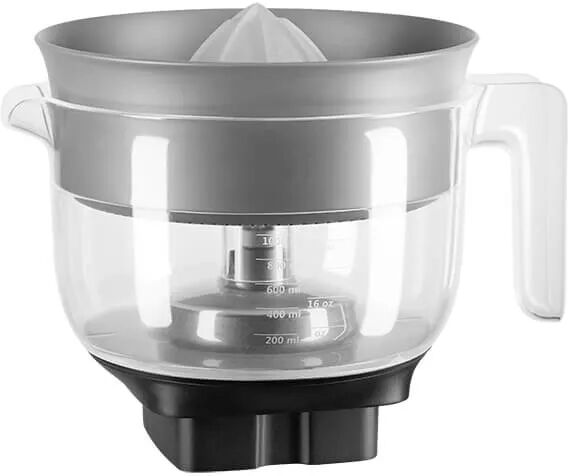
KitchenAid Artisan K400 Blender Citrus PressThe KitchenAid 1 litre Citrus Press will turn the KitchenAid Artisan K400 Blender into a juicing machine. The citrus press includes everything you need to automatically juice citrus fruit - gear assembly, pulp basket, reamer and 1 litre BPA-free juice container with pouring spout. Perfect for juicing oranges, limes, grapefruit and other citrus fruits. All parts of the KitchenAid citrus press are dishwasher safe. The KitchenAid 1 litre citrus press is supplied with a 2 year KitchenAid guarantee.58,50 £*Shipping: 0,00 £Secure redirect to the provider
-
Did Unreal Engine and Blender work together?
Yes, Unreal Engine and Blender have worked together to provide a seamless workflow for game developers and artists. Blender is a popular open-source 3D creation software that can be used to create assets and animations, which can then be imported into Unreal Engine for game development. The two tools complement each other well, allowing users to create high-quality content and bring their ideas to life in Unreal Engine. Additionally, both Unreal Engine and Blender have active communities that share resources and provide support for users looking to integrate the two platforms. **
-
How does the Blender road system work?
The Blender road system allows users to create and manipulate roads within the 3D environment. Users can add roads by using the "Add" menu and selecting "Mesh" and then "Roads." Once a road is added, users can adjust its shape, width, and other properties using the road editing tools. The road system also allows for the creation of intersections, bridges, and tunnels, making it a versatile tool for creating realistic road networks within Blender. **
-
How can one work with a blender?
To work with a blender, start by assembling the blender by attaching the pitcher to the base and securing the lid. Next, add the ingredients you want to blend into the pitcher, making sure not to overfill it. Then, plug in the blender and select the appropriate speed or setting for the ingredients you are blending. Finally, press the power button to start the blending process and hold it until the ingredients are fully blended to your desired consistency. Always remember to unplug the blender and disassemble it for cleaning after each use. **
-
Why do the controls not work in Blender?
The controls in Blender may not work due to various reasons such as software glitches, outdated drivers, conflicting key bindings, or hardware issues. It is important to ensure that the software is up to date, the drivers are updated, and there are no conflicts with other programs or devices. Additionally, checking the hardware components such as the keyboard and mouse for any malfunctions can help resolve control issues in Blender. **
* All prices are inclusive of VAT and, if applicable, plus shipping costs. The offer information is based on the details provided by the respective shop and is updated through automated processes. Real-time updates do not occur, so deviations can occur in individual cases. ** Note: Parts of this content were created by AI.