Buy work-shop.eu ?
We are moving the project
work-shop.eu .
Are you interested in purchasing the domain
work-shop.eu ?
domain@kv-gmbh.de · 0541-91531010
Buy work-shop.eu ?
Does the touchscreen work underwater?
No, most touchscreens do not work underwater. Water can interfere with the electrical signals that the touchscreen relies on to function, making it difficult or impossible to use. However, there are some specialized touchscreens and devices that are designed to work underwater, but these are not common in everyday consumer electronics. **
How does a touchscreen work?
A touchscreen works by using a transparent panel that detects touch and pressure from a user's fingers or a stylus. The panel is made up of multiple layers, including a protective outer layer, a capacitive layer, and a display layer. When a user touches the screen, the capacitive layer detects the electrical charge from the user's touch and sends the information to the device's processor, which then interprets the touch and carries out the corresponding action on the screen. This allows users to interact with the device by tapping, swiping, and pinching the screen to control various functions and applications. **


Similar search terms for Touchscreen
Top-Angebote
Products related to Touchscreen:
-
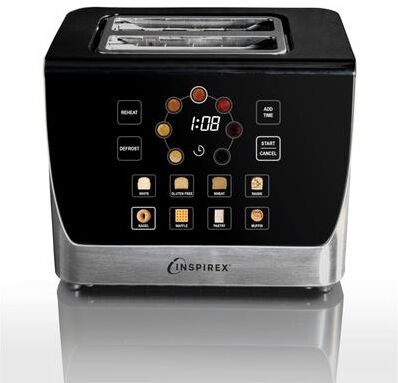
Inspirex Interactive Touchscreen Automatic ToasterWith the Inspirex Touchscreen Toaster, perfection is at your fingertips. Toast your favorite type of bread, bagel, English muffin, or pastry, perfectly crispy on the outside while keeping the inside moist and delicious.99,99 $*Shipping: 0,00 $Secure redirect to the provider
-
Philips Fingerprint Touchscreen Electronic DeadboltFeaturing a variety of access methods, you can unlock this lock by fingerprint, PIN code, one-time PIN code, or a mechanical key. Besides, auto-lock, ultra long-life battery, and multiple alert functions provide you additional peace of mind.89,19 $*Shipping: 0,00 $Secure redirect to the provider
-
Uplift Essentials Back Seat Organizer With Touchscreen Tablet Holder Back Seat Organizer With Touchscreen Tablet HolderTransform your vehicles rear cabin into a highfunctioning entertainment and organization hub. This car back seat organizer is a musthave travel accessory designed to keep your essentials tidy while providing handsfree entertainment for passengers....49,97 $*Shipping: 0,00 $Secure redirect to the provider



-
How does a touchscreen phone work?
A touchscreen phone works by using a capacitive touch screen that responds to the electrical charge from your fingertips. When you touch the screen, it creates a disruption in the screen's electrical field, which is detected by sensors in the phone. The phone then processes this input and translates it into the desired action, such as opening an app or typing a message. The responsiveness and accuracy of the touchscreen are determined by the quality of the sensors and the software algorithms used to interpret the touch input. **
-
Does the touchscreen switch not always work?
The touchscreen switch may not always work due to various reasons such as software glitches, hardware issues, or physical damage to the screen. It is important to troubleshoot the problem by restarting the device, updating the software, or checking for any physical damage. If the issue persists, it may require professional assistance to repair or replace the touchscreen switch. **
-
Does the touchscreen toggle switch not always work?
The touchscreen toggle switch may not always work due to various reasons such as software glitches, hardware issues, or user error. It is important to ensure that the device's software is up to date and that the touchscreen is clean and free from any obstructions. If the issue persists, it may be necessary to seek technical support or have the device inspected for any hardware malfunctions. **
-
Why doesn't the iPad touchscreen work after installation?
The iPad touchscreen may not work after installation due to a variety of reasons such as a faulty or damaged screen, improper installation causing loose connections, incompatible replacement parts, or software issues. It is important to ensure that the replacement screen is of high quality and compatible with the specific iPad model. Additionally, double-checking all connections and performing a software reset may help resolve the issue. If the problem persists, seeking professional help or contacting the manufacturer for support may be necessary. **

Why does the iPhone touchscreen only work halfway?
The iPhone touchscreen may only work halfway due to a hardware or software issue. Hardware issues could include a damaged or malfunctioning touchscreen, while software issues could be caused by a glitch or a corrupted system. It is also possible that the touchscreen is only responding to touch inputs in certain areas due to a calibration problem. In any case, it is recommended to troubleshoot the issue by restarting the device, updating the software, or seeking professional assistance if the problem persists. **
Are touchscreen displays good?
Touchscreen displays can be good in certain situations. They offer a more intuitive and interactive user experience, especially for tasks like drawing, gaming, and navigating maps. However, they may not be ideal for all use cases, such as long periods of typing or precise tasks that require a mouse or stylus. Additionally, they can be more prone to smudges and fingerprints, which may affect visibility. Ultimately, the effectiveness of a touchscreen display depends on the specific needs and preferences of the user. **
Top-Angebote
Products related to Touchscreen:
-
Make Brilliant Work: Lessons on Creativity, Innovation, and Success by Rod JudkinsDescription. Condition: BRAND NEW. Format: Paperback. Make Brilliant Work is an inspiring guide to unlocking your creative potential, showing you the methods and techniques that will transform your efforts and help you achieve your best ever work.. You don’t have to be brilliant to produce brilliant work. Many of the characters you will meet in this book failed at school, lacked natural talent, were not especially gifted or were repeatedly sacked. But their methods produced brilliant work – and they will work for you, too. Make Brilliant Work is the essential book from Rod Judkins, author of the international bestseller The Art of Creative Thinking.. Whatever your creative endeavour, you might find it hard to produce something significant and important. The real-life heroes in this book will show you how to make the transformation from ordinary to extraordinary. From Frida Kahlo to Steve Jobs, and star architect Zaha Hadid: the figures in Make Brilliant Work will show you how to think for yourself, take risks and persevere to create brilliant work.. Title. Make Brilliant Work: Lessons on Creativity, Innovation, and Success by Rod Judkins. Delivery. Content. Reviews2,49 £*Shipping: 2,99 £Secure redirect to the provider
-
Pan Make Brilliant Work: Lessons on Creativity, Innovation and Success by Rod Judkins - Paperback - Self-Help/Business Creativity Guide, Author ofMake Brilliant Work is an inspiring guide by Rod Judkins, drawing on the real-life stories of visionaries from Frida Kahlo to Steve Jobs. This paperback book reveals the methods and mindsets that turn ordinary effort into extraordinary results. Judkins proves that talent alone never guaranteed success — persistence, risk-taking and original thinking did. A motivating read for anyone wanting to unlock their creative potential at work or in life. The book profiles figures who failed at school, were told they lacked talent, or were fired more than once, yet went on to achieve great things. Written by Rod Judkins, published by Pan Macmillan, this book is a reassuring truth: you don't have to be naturally brilliant to produce brilliant work.2,99 £*Shipping: 2,99 £Secure redirect to the provider
-
Inspirex Interactive Touchscreen Automatic ToasterWith the Inspirex Touchscreen Toaster, perfection is at your fingertips. Toast your favorite type of bread, bagel, English muffin, or pastry, perfectly crispy on the outside while keeping the inside moist and delicious.99,99 $*Shipping: 0,00 $Secure redirect to the provider
-
Does the touchscreen work underwater?
No, most touchscreens do not work underwater. Water can interfere with the electrical signals that the touchscreen relies on to function, making it difficult or impossible to use. However, there are some specialized touchscreens and devices that are designed to work underwater, but these are not common in everyday consumer electronics. **
-
How does a touchscreen work?
A touchscreen works by using a transparent panel that detects touch and pressure from a user's fingers or a stylus. The panel is made up of multiple layers, including a protective outer layer, a capacitive layer, and a display layer. When a user touches the screen, the capacitive layer detects the electrical charge from the user's touch and sends the information to the device's processor, which then interprets the touch and carries out the corresponding action on the screen. This allows users to interact with the device by tapping, swiping, and pinching the screen to control various functions and applications. **
-
How does a touchscreen phone work?
A touchscreen phone works by using a capacitive touch screen that responds to the electrical charge from your fingertips. When you touch the screen, it creates a disruption in the screen's electrical field, which is detected by sensors in the phone. The phone then processes this input and translates it into the desired action, such as opening an app or typing a message. The responsiveness and accuracy of the touchscreen are determined by the quality of the sensors and the software algorithms used to interpret the touch input. **
-
Does the touchscreen switch not always work?
The touchscreen switch may not always work due to various reasons such as software glitches, hardware issues, or physical damage to the screen. It is important to troubleshoot the problem by restarting the device, updating the software, or checking for any physical damage. If the issue persists, it may require professional assistance to repair or replace the touchscreen switch. **
Similar search terms for Touchscreen
-
Philips Fingerprint Touchscreen Electronic DeadboltFeaturing a variety of access methods, you can unlock this lock by fingerprint, PIN code, one-time PIN code, or a mechanical key. Besides, auto-lock, ultra long-life battery, and multiple alert functions provide you additional peace of mind.89,19 $*Shipping: 0,00 $Secure redirect to the provider
-
Uplift Essentials Back Seat Organizer With Touchscreen Tablet Holder Back Seat Organizer With Touchscreen Tablet HolderTransform your vehicles rear cabin into a highfunctioning entertainment and organization hub. This car back seat organizer is a musthave travel accessory designed to keep your essentials tidy while providing handsfree entertainment for passengers....49,97 $*Shipping: 0,00 $Secure redirect to the provider
-
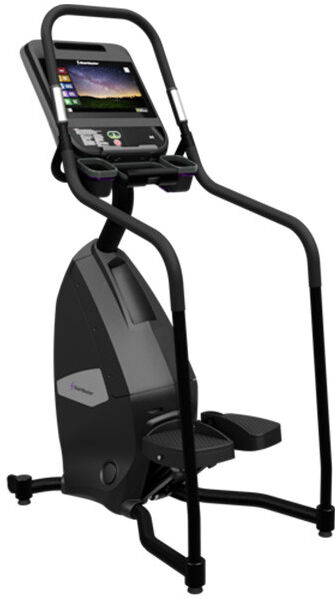
StairMaster 8FC FreeClimber 15â€� touchscreen consoleThe StairMaster 8FC FreeClimber brings a powerful, low-impact workout to your gym, perfect for users of all fitness levels. Backed by over 30 years of StairMaster expertise, it's built to last and designed to mimic natural, smooth stepping, reducing stress on the joints. The advanced console...6375,00 £*Shipping: 0,00 £Secure redirect to the provider
-
Beldray Digital LED Touchscreen Steam IronTake the guesswork out of ironing with the Beldray Digital LED Touchscreen Steam Iron. Designed for precision and ease of use, this advanced steam iron combines powerful performance with intuitive digital controls, helping you achieve smooth, crease‑free results across a wide range of fabrics. Powered by an impressive 3200W, the iron heats quickly and delivers consistent steam through a smooth ceramic soleplate that glides effortlessly over garments. The digital LED touchscreen features four preset fabric heat modes, allowing you to select the correct temperature with confidence and reduce the risk of scorching delicate items. For added reassurance, the iron includes an auto shut‑off function along with self‑clean, anti‑calc and anti‑drip features to support long‑lasting performance and protect clothing from water marks. A generous 380ml water tank, filled easily using the included measuring cup, allows longer ironing sessions with fewer refills. Finished with a 3‑metre power cord for extended reach, this steam iron offers flexibility, control and modern convenience. Supplied with a manufacturer’s 1‑year guarantee. Power: 3200W. Water Tank Capacity: 380ml. Cord Length: 3m. Dimensions: 30(L) x 15.2(W) x 13(H) cm.34,99 £*Shipping: 3,50 £Secure redirect to the provider
-
Does the touchscreen toggle switch not always work?
The touchscreen toggle switch may not always work due to various reasons such as software glitches, hardware issues, or user error. It is important to ensure that the device's software is up to date and that the touchscreen is clean and free from any obstructions. If the issue persists, it may be necessary to seek technical support or have the device inspected for any hardware malfunctions. **
-
Why doesn't the iPad touchscreen work after installation?
The iPad touchscreen may not work after installation due to a variety of reasons such as a faulty or damaged screen, improper installation causing loose connections, incompatible replacement parts, or software issues. It is important to ensure that the replacement screen is of high quality and compatible with the specific iPad model. Additionally, double-checking all connections and performing a software reset may help resolve the issue. If the problem persists, seeking professional help or contacting the manufacturer for support may be necessary. **
-
Why does the iPhone touchscreen only work halfway?
The iPhone touchscreen may only work halfway due to a hardware or software issue. Hardware issues could include a damaged or malfunctioning touchscreen, while software issues could be caused by a glitch or a corrupted system. It is also possible that the touchscreen is only responding to touch inputs in certain areas due to a calibration problem. In any case, it is recommended to troubleshoot the issue by restarting the device, updating the software, or seeking professional assistance if the problem persists. **
-
Are touchscreen displays good?
Touchscreen displays can be good in certain situations. They offer a more intuitive and interactive user experience, especially for tasks like drawing, gaming, and navigating maps. However, they may not be ideal for all use cases, such as long periods of typing or precise tasks that require a mouse or stylus. Additionally, they can be more prone to smudges and fingerprints, which may affect visibility. Ultimately, the effectiveness of a touchscreen display depends on the specific needs and preferences of the user. **
* All prices are inclusive of VAT and, if applicable, plus shipping costs. The offer information is based on the details provided by the respective shop and is updated through automated processes. Real-time updates do not occur, so deviations can occur in individual cases. ** Note: Parts of this content were created by AI.